
Photo or text → anime · anime, manga, Ghibli-inspired, chibi
AI anime generator: your photo or your words, drawn as anime
ToonZap's AI anime generator works two ways: upload a photo and it is redrawn as anime, or describe a character or a scene and it is drawn from scratch — in 4 anime looks, from vivid cel-shaded anime and black-and-white manga to soft Ghibli-inspired painting and cute chibi. You get a still image, usually in under a minute; if you want it to move afterwards, it opens straight in the video tools.
Free account, no credit card · 40 credits: 3 photo-to-anime runs or 5 anime images from text
No photo? Create anime from text — from 8 credits.
- 4 anime styles, or your own
- Photo → anime: 12 credits
- Text → anime: from 8 credits
- Price shown before you start


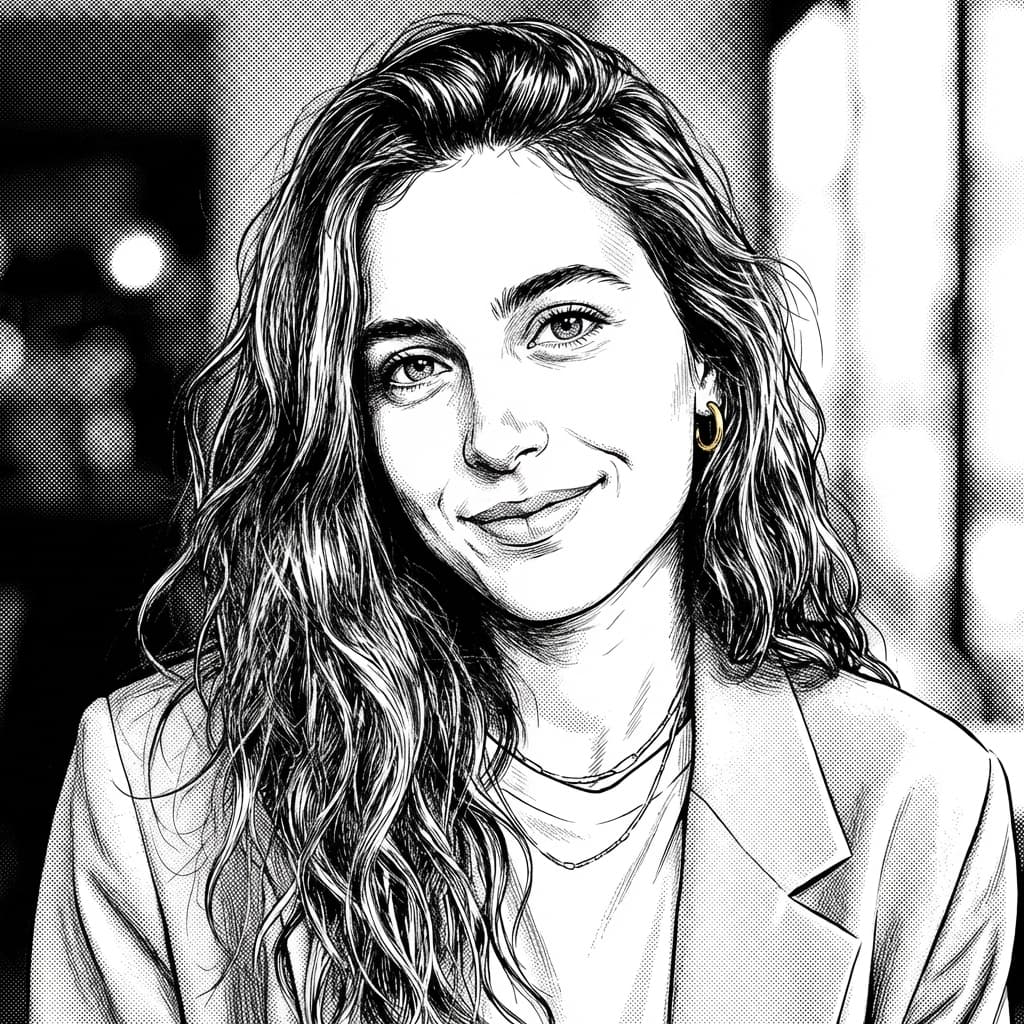
Real example: the same photo before and after, generated with ToonZap, no retouching.
Which page is for you?
One anime AI, several doors
Whether you call it AI anime, anime AI, an anime maker or an AI anime image generator, this page covers the whole tool: from a photo or from text, the four anime looks, what it costs. If you are after something more specific, one of these fits better:
- Photo to anime — the same photo-to-anime tool, told for portraits: the visual codes of anime and what to do with your anime self.
- Photo to Ghibli-style art — only the soft, hand-painted look, explained in detail.
- AI cartoon generator — every style, not just anime: Pixar-like 3D, comic book, watercolor, pixel art and more.
- Video to anime — you have a short video rather than a photo, and want it redrawn as anime with the same moves.
Three ways in
Photo to anime, text to anime, or every style at once
Each card opens the tool made for it, with its real price.
Photo to anime
Upload a selfie, a group photo or your pet, and the AI redraws it as anime. It is asked to keep the faces, the pose and the framing, and to redraw everything else in the style. Add a touch-up in one sentence if you like: "school uniform", "cherry blossoms behind me".
12 creditsup to 20 with other models
Turn my photo into animeText to anime
No photo needed: describe a character or a scene — who, where, doing what — and the AI anime image generator draws it from scratch, square, portrait, landscape or wide. Ask for several variations at once (each one is billed) and keep the best.
from 8 credits
Create anime from textOne photo, all 4 anime styles
Not sure which look suits you? The multi-style tool redraws one photo in several styles in one go — tick anime, manga, Ghibli-inspired and chibi (up to 6 styles at once). From 4 styles, each one costs 10 credits instead of 12.
40 credits for the 4
Compare the anime stylesStyles
One photo, 4 AI anime styles
The same portrait, redrawn by the AI anime generator in each look — real results, no retouching.


No photo? Try an anime prompt in one click
Each one opens Text → Cartoon with the description already written and the style selected, ready to change. Drawing it is included in your welcome credits.
The rainy cafe
Anime
A girl with headphones sitting by the window of a cozy cafe at sunset, rain on the glass, city lights outside, a cup of cocoa
Draw it8 credits · includedThe forest house
Ghibli-inspired
A small wooden house in a lush forest garden full of sunflowers, a boy watering the plants, big fluffy clouds in a blue summer sky
Draw it8 credits · includedThe swordsman
Manga
A calm young swordsman reading under a cherry tree in bloom, petals falling around him, dramatic speed lines in the background
Draw it8 credits · includedThe ninja cat
Chibi
A tiny ninja cat with a red headband and a little wooden sword, jumping between rooftops under a full moon
Draw it8 credits · includedHow it works
Your anime art in three steps
1. Start from a photo or a sentence
Upload a picture to turn into anime, or write what you want drawn. Nothing to install and no drawing skills: it all happens in your browser.
2. Pick the anime style
Anime, manga, Ghibli-inspired or chibi — or one of the 10 other styles, or a look you describe in your own words. The cost shows before you generate.
3. Download, or bring it to life
Your anime image is usually ready in under a minute and saved in your gallery. Download it, try another style, or open it in a video tool to make it move.
What it costs — and what is free
- The account is free, with no credit card, and comes with 40 credits: 3 photo-to-anime runs (12 credits each with the default model, up to 20 with the others), 5 anime images from text (from 8 credits each), or one photo in all 4 anime styles at once (40 credits).
- On the free plan, your balance is topped back up to 30 credits every month — 2 more photo-to-anime runs or 3 from text — and downloads carry a small ToonZap watermark. A subscription removes it, and so does a credit pack for 30 days after purchase.
- Need more? The Pack Start (€1.99, 55 credits, no subscription) pays for 4 more photo-to-anime runs or 6 images from text, and pack credits never expire.
- If a model refuses your image or fails, another one takes over, never at a higher price. If none of them delivers, your credits are refunded.
Plans and credit packs in detail: see pricing.
Optional
Then make your anime move
Every image is saved in your creations, and the result screen offers the next step. These are videos: the welcome credits pay for images, not for them.
Animate your anime image
Open it in image to video and keep "Original photo": your drawing is set in motion as it is, with sound — from 55 credits.
Image to video AIAn anime clip from text
The text to video tool opens in the anime style: a silent 5-second clip from 55 credits, or 8 seconds with the voices of your lines for 77.
AI animation generatorYour video, redrawn as anime
Upload a short clip: same moves, same framing, original sound, redrawn as anime — from 80 credits.
Video to animeGood to know
What the generator does not promise
A redraw, not a filter
The AI redraws the whole picture with anime proportions — bigger eyes, simpler features. You usually stay recognizable, but a face can change, and chibi changes it the most. The bigger the face in the frame, the more of its likeness the anime version keeps.
Your characters, not famous ones
The styles are generic "in the manner of" looks. Characters from a known anime series, or a public figure, can be refused by the models — ToonZap warns you before sending when it spots a protected name, and if every model refuses, you are not charged. Describe your own character instead.
FAQ
AI anime generator — frequently asked questions
How do I turn a photo into anime with AI?
Create your account, open Image → Cartoon with the Anime style selected and upload the photo. Keep the shape of the photo or choose a format, add a touch-up sentence if you like ("school uniform", "neon city at night"), and generate. Your anime portrait is usually ready in under a minute and lands in your gallery, ready to download. Prefer softer or black-and-white? Switch to Ghibli-inspired or Manga.
Is this AI anime generator free?
For images, yes, within your credits. The account is free, needs no credit card and comes with 40 credits: 3 photo-to-anime runs or 5 anime images from text, or one photo in all 4 anime styles at once. On the free plan, your balance is topped back up to 30 credits every month, and downloads carry a small ToonZap watermark. Anime videos — an animated image, a clip from text, a video redrawn as anime — are not included: they start at 55 credits.
Can the AI anime generator create anime art from text?
Yes. Text → Cartoon draws a character or a scene from your description, from 8 credits: say who, where and what they are doing, pick Anime, Manga, Ghibli-inspired or Chibi, then a format. It will not have anyone's real face — to get your own face as anime, start from a photo.
Which anime styles can I choose?
Four: Anime (cel shading and vivid colors), Manga (black-and-white ink and screentones), Ghibli-inspired (a soft hand-painted look) and Chibi (cute, super-deformed). The same tools offer 10 more styles — Pixar-like 3D, comic book, watercolor, pixel art… — plus a custom style you describe in words. They are generic artistic interpretations: ToonZap is not affiliated with any animation studio.
Will my anime portrait still look like me?
The AI is asked to keep your face, pose and framing, so you usually stay recognizable — with anime proportions. Sharp, well-lit photos where the face is large and unhidden work best. Chibi is the most stylized of the four; anime and manga keep the most likeness.
Can I make characters from a famous anime series?
No. The models refuse protected characters, and ToonZap warns you before sending when it spots one in your text. Describe your own hero — hair, outfit, setting, mood — in the anime style of your choice: a look "in the manner of" is fine, a licensed character is not. If every model refuses, your credits are refunded.
Can I animate my anime picture?
Yes: every image is saved in your creations, and the result screen offers the next step. Animate it into a short clip with sound (from 55 credits) — keep "Original photo" so it moves as drawn. You can also make a short anime clip straight from text (from 55 credits, silent), or redraw a video of your own as anime (from 80). These are videos: the welcome credits pay for images, not for them.
Can I use my anime art commercially?
Commercial use — ads, client work, a monetized channel, merch — is included from the Starter plan, and a Pack Plus (€14.99) unlocks the same rights for 30 days. On the free account and the plans below it, your anime images are for personal use: avatars, banners, gifts. On the free plan, downloads carry a small ToonZap watermark; any subscription removes it, and a credit pack removes it too for 30 days after purchase.
Which AI model draws the anime?
The best image model available to us for the job goes first. If it refuses your picture or fails, another one takes over without asking you anything, never at a higher price. The models change as better ones come out: the current list is on our About page.
The models behind the tool: the AI models we use today.
Your first anime images are included
Create your free account — no credit card — and spend your 40 welcome credits on 3 photo-to-anime runs or 5 anime images from text.
4 anime styles · usually ready in under a minute · price shown before you start
ToonZap is not affiliated with any animation studio; the styles are generic artistic interpretations.