
Turn your photo into real anime art
Not a blurry filter — a genuine redraw. The AI rebuilds your portrait with sharp anime linework, huge expressive eyes, and vivid cel shading. Your anime self, ready in under 30 seconds.
Create my anime portraitFree credits at sign-up — no credit card required
Why anime portraits hit different
Anime is not one style but a whole grammar of drawing, refined over decades of Japanese animation: line art that stays razor sharp at any resolution, eyes built from layered gradients and glints that carry more emotion than an entire photographed face, hair sculpted into bold glossy locks, and cel shading that carves light into clean dramatic planes. It is the most imitated visual language on the internet — and the easiest to get wrong.
Cheap anime filters simply smooth your photo and enlarge your eyes. ToonZap's AI actually redraws you: it maps your bone structure, hairstyle, and expression onto true anime construction rules, picks a shading scheme that flatters your lighting, and outputs a portrait that could pass for character key art. You keep your identity; you gain a protagonist's presence.
The visual codes of anime art
Four conventions separate real anime art from a generic cartoon — the AI applies all four to your portrait:
Sharp, confident linework
Clean dark outlines with varying weight — the backbone of every anime frame, instantly separating it from western cartoons.
Large luminous eyes
Oversized irises layered with gradients, highlights, and reflections — where all the emotion of the character lives.
Cel shading
Hard-edged blocks of shadow and light instead of soft gradients, giving faces that unmistakable animated depth.
Stylized gravity-defying hair
Hair drawn in bold sculpted locks with glossy highlights — often the most recognizable part of an anime character design.
Photo to manga: the black-and-white version
The same photo, two tiles of the same tool. Pick Manga or Anime under the image, then drag the slider to see the original turn into ink and screentones, or into colour.
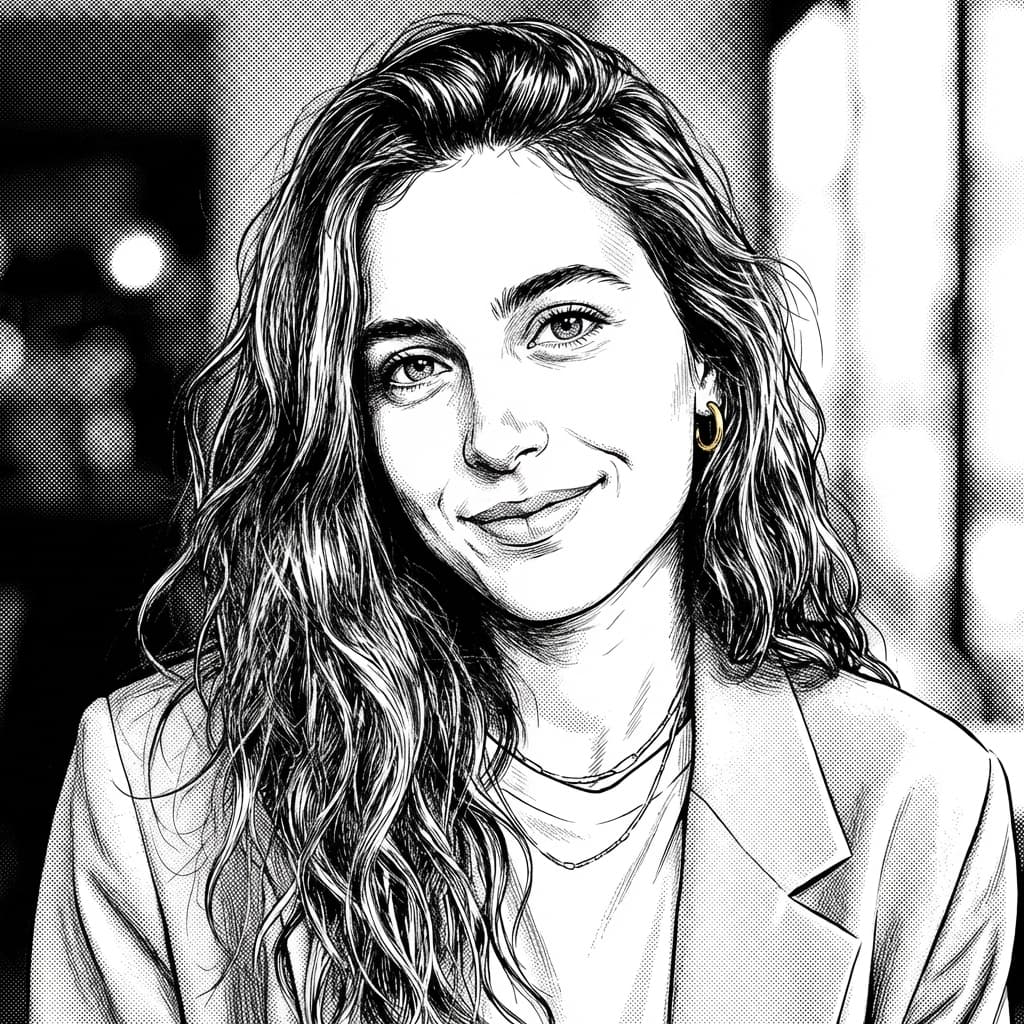

Faites glisser le curseur pour comparer
Real outputs generated with ToonZap — manga and anime styles, no retouching.
What the manga style does to your photo
Manga is drawn for print, not for screens. The style keeps no colour at all: the AI traces your face and hair with black ink lines that thicken in the curves, fills the deepest shadows with solid black, and builds every mid-tone out of screentone — the grey dot patterns of a printed page. The white of the paper is left for the highlights. The result reads like a panel from a comic, not like a photo with a black-and-white filter.
It works best on a contrasted photo: side lighting gives the AI clear shadows to turn into blacks and tones. Want speed lines or a dramatic stare? Add a short note in the optional edit field — the style itself is already chosen. Trying it is free: your 40 welcome credits cover 3 portraits at 12 credits each.
Try the manga style on my photoYour anime transformation in 3 steps
No drawing tablet, no years of practice — the full transformation runs in your browser in under a minute.
1. Upload your photo
A selfie, a cosplay shot, or a portrait with your best lighting — drag and drop the image, no preparation needed.
2. Choose the anime style
Pick “Anime” from the 14 styles. Refine with a prompt if you want: cherry blossom background, neon city night, school uniform…
3. Download your anime self
The AI renders your portrait in 10 to 30 seconds. Save it in high resolution or reroll a new variation with a single click.
What to do with your anime portrait
An anime persona online
Streamers, gamers, and creators use an anime avatar as a consistent identity across Twitch, YouTube, Discord, and X — memorable without being a photo.
Gifts for anime fans
Turn a friend into the protagonist of their own series. Printed as a poster or slipped into a frame, it is the gift an anime fan actually wants.
Covers, banners, thumbnails
Playlist covers, fanfic headers, video thumbnails, event posters — the bold anime look grabs attention at any size, on any platform.
Photo to anime — frequently asked questions
How do I turn a photo into anime art?
Upload your photo to ToonZap, select the anime style from the 14 available styles, and generate. In 10 to 30 seconds the AI redraws you with true anime conventions — sharp clean linework, large expressive eyes, cel shading, stylized hair — while preserving what makes your face yours.
Is this anime filter free?
You can try it free: a new ToonZap account receives 40 credits with no credit card required, and one portrait costs 12 credits on the standard model — 3 free anime or manga portraits. Free images carry a light watermark. After that you need credits: the Pack Start is €1.99 for 55 credits, or you can pick a monthly plan.
How do I turn a photo into manga?
Same tool, different tile: choose “Manga” instead of “Anime” in the grid of 14 styles. The AI redraws your portrait in black ink with screentone shading — fine pen lines, solid blacks, grey dot patterns and white paper for the highlights. The result is ready in 10 to 30 seconds.
Is the manga style really black and white?
Yes. That is the identity of the style: black ink, white paper and a range of greys made of screentones, like a printed manga page. If you want colour, pick the Anime style instead — both run on the same photo, so you can generate one of each and compare.
Can I print my manga portrait?
Yes. Black-and-white screentones print well, often better than colour styles: a card, a bookmark, a small framed print. The download is 1024 px on its longest side — fine for small prints and avatars; for a poster, upscale it first.
What is the difference between the anime and Ghibli styles?
The anime style goes for impact: crisp dark outlines, saturated colors, glossy highlights in the eyes, and dramatic cel shading — think modern seinen or shonen key art. The Ghibli style goes for softness: watercolor textures, muted palettes, and gentle painted light. Both are available on ToonZap, so you can generate the two from the same photo and compare.
Can I use my anime portrait as a profile picture or for content?
Yes — your generations are yours to download in high resolution and use as avatars, banners, thumbnails, or prints. An anime persona is a popular way for streamers, VTuber fans, and content creators to build a recognizable identity without showing their real face everywhere.
Become the protagonist of your own series
Create your account, spend your free welcome credits, and meet your anime self in under a minute.
Explore more styles
ToonZap is not affiliated with any studio; styles are generic artistic interpretations.