
Turn your photo into a chibi character
Upload a portrait, a couple selfie or a picture of your dog and get it back as chibi art: a big round head, enormous sparkly eyes, blush on the cheeks and a soft pastel palette. Your hair, your clothes and your smile stay yours.
40 free credits when you sign up, no card needed · 12 credits per image
Before and after: four photos turned into chibi art
Four untouched results from the tool. Notice what it keeps (hairstyle, freckles, glasses, the hoodie, the street behind) and what it changes: bigger eyes, a rounder face, gentler colours.
 Photo
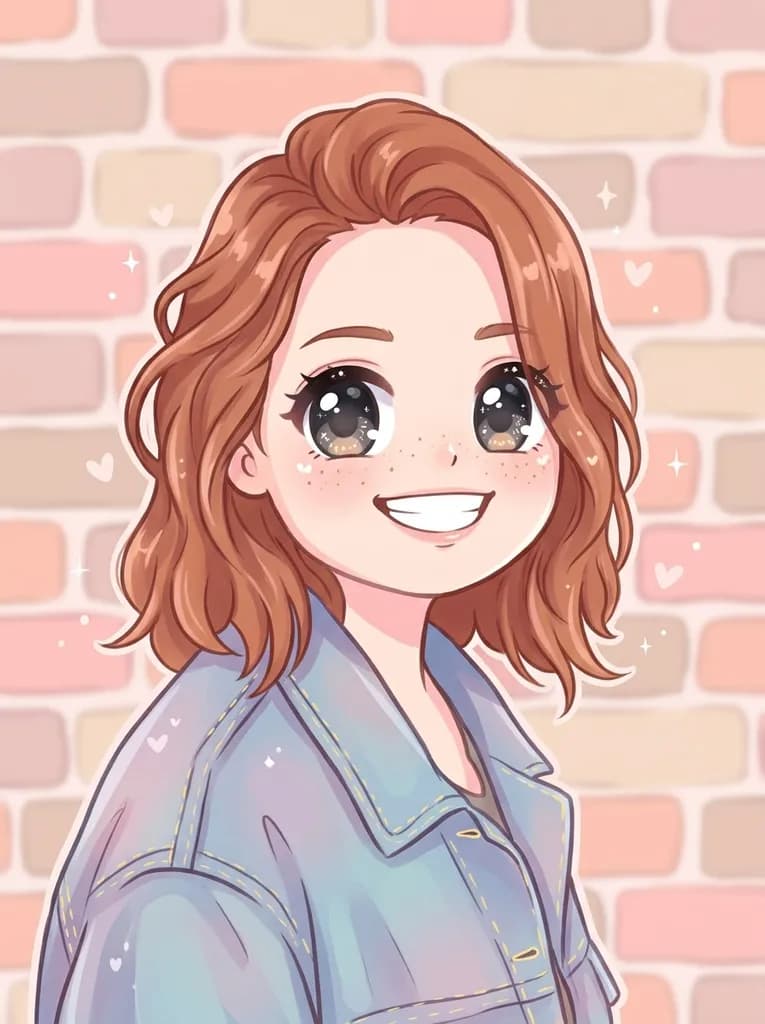 Chibi
 Photo
 Chibi
 Photo
 Chibi
 Photo
 Chibi
The original photos were generated by AI: these people and this dog do not exist. They were then transformed by ToonZap with the standard model of the tool, exactly as your photo would be.
How it works, in 3 steps
No drawing skills and no app to install: a phone photo is enough.
- 1
Upload your photo
Pick a sharp photo where the face (or faces) can be seen clearly, ideally facing the camera or in three-quarter view. JPG, PNG or WEBP.
- 2
Keep the Chibi style
The button below opens the tool with Chibi already selected. If you like, add a short note in “Image touch-ups (optional)”: “pink hoodie”, “cherry blossom background”.
- 3
Download your chibi
The picture arrives in about thirty seconds. Download it, or run it again with another photo or another of the 14 styles to compare.
Which photos make the cutest chibis
The tool redraws the whole picture and keeps its framing. That matters for chibi: on a head-and-shoulders portrait you get the big eyes, the round face and the pastel colours, but there is no body to shrink. For the full “huge head, tiny body” effect, start from a photo where the person or the animal is seen from head to toe, like the dog above.
Expression carries a chibi. A real smile or a wide-eyed look comes out much stronger than a neutral face, because the style exaggerates whatever it finds. The background is redrawn too and stays in the picture: a calm setting keeps the attention on the character.
- A sharp photo, without motion blur, in soft daylight.
- Eyes visible and open: they become the centre of the drawing.
- Full body in frame if you want the tiny-body proportions.
- For a group, faces large enough: crop around the people before uploading.
Chibi, anime or cartoon: which one to choose?
Chibi is the cutest of the styles: proportions are pushed towards a plush toy, the colours are candy-soft and the mood is always sweet. It suits a profile picture, a reaction image or a small gift. If you want a portrait that still looks like an adult character, with sharper lines and more detail, the Anime style is a better fit. For a bolder, more graphic look, try a classic cartoon style.
Each render is charged separately, so the same photo can go through two or three styles. Putting them side by side is often the quickest way to see which one feels most like you.
What to do with your chibi
Avatar and profile picture
A chibi version of yourself stands out on a social profile, a gaming account or a group chat, and stays recognisable to people who know you.
Reaction images and stickers
Use it as a reaction picture in your messages, or print it on sticker paper for a planner or a laptop. The picture keeps its background: it is not a cut-out sticker.
A small personalised gift
A chibi of a couple, a best friend or the family dog makes a sweet card, a mug design or a framed print for a desk.
How much does it cost?
Creating an account is free and comes with 40 credits, no card needed. One chibi costs 12 credits with the standard model, so the welcome credits cover 3 pictures: enough to try several photos. Images made on the free account carry a light watermark.
After that, the Pack Start costs €1.99 for 55 credits, with no subscription, which is 4 chibis. Monthly plans, with no commitment, remove the watermark and add credits every month.
See all pricingPhoto to chibi: frequently asked questions
What is a chibi?
Chibi is a cute drawing style from Japanese illustration: a character with an oversized head, a small body, very large shiny eyes and simplified features. ToonZap applies it to your own photo, so the chibi has your hair, your clothes and your expression.
Is it free?
You can try it for free: 40 credits are given when you sign up, no card needed, and one chibi costs 12 credits with the standard model, so 3 pictures. Free-account images carry a light watermark; after that you need a credit pack or a plan.
Will it still look like me?
That is the goal: the tool keeps your hairstyle, hair colour, skin tone, glasses, beard or freckles and the clothes you are wearing. The style changes the proportions and the colours, not who is in the picture. If a version misses, try a clearer photo.
Can I get a transparent sticker?
No. The tool redraws the whole photo, background included, and delivers a regular image. You can print it on sticker paper and cut it out by hand, or use it as it is for an avatar or a reaction image.
Does it work for couples, groups and pets?
Yes. Everyone in the photo is redrawn in the same chibi style, and animals work just as well as people. For groups, pick a photo where each face is large and sharp.
Can I print it?
Yes. The file is 1024 pixels on its longest side: enough for a card, a sticker sheet or a small frame. For a bigger print, enlarge it first with the ToonZap upscale tool.
Ready to meet your chibi self?
One photo, about thirty seconds. Your 40 free credits cover 3 pictures.